Check PCM Tune Lock Status
Last updated: Oct 26, 2026
3
views

How to Check if Your PCM Tune is Locked
Before tuning the vehicle, you can verify whether your PCM has a PCMTec tuner-locked tune (in most of the cases) that would prevent you from making modifications.
Requirements
- FORScan software installed on your device
Steps to Check Tune Lock Status
- Open FORScan on your device
- Connect to your vehicle's PCM
- Run a detection in FORScan to identify the current PCM strategy
Interpreting the Results
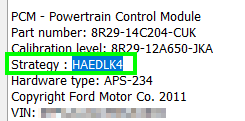
PCM is NOT tuner-locked: - You will see a valid strategy string (e.g., HACCKGA, HAEDLK4) displayed - This indicates the PCM can be modified with tuning software
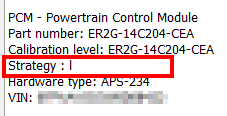
PCM IS tuner-locked: - The strategy string will appear different from a standard valid string - This indicates the PCM has been locked and cannot be modified